
Home Guides The Subscription Audit That Saves $100 a Month
The Subscription Audit That Saves $100 a Month
Most households don't have a spending problem so much as a leak problem. Money leaves the account in small, polite, auto-renewing amounts, and because each one is under $20, none of them ever triggers the mental alarm that a $100 purchase would. Add them up, though, and the average household we surveyed in our reader poll was paying for eleven recurring services — and could name only seven of them from memory.
A subscription audit is the fix, and it takes about forty minutes once a quarter. Done properly, it reliably frees up $80–$120 a month. Below is the exact process we use at Thrift Gull, including the checklist, the cancellation script and the traps that make the savings quietly disappear again.
Step 1: Pull three statements, not one
The single biggest mistake is auditing only your main current account. Subscriptions hide in three places:
- Your bank account and credit cards. Export the last 90 days of transactions and search for keywords: ltd, inc, gmbh, billing, subscription, paypal, apple.com/bill, google, amazon prime. Ninety days matters because some services bill quarterly.
- Your app stores. Apple and Google both keep a subscriptions page buried in account settings. This is where the meditation app you used for a week in 2023 is still quietly charging you $12.99 a month.
- Your email. Search for "your receipt", "payment successful" and "renewal notice". Annual renewals — antivirus software, domain names, cloud storage — only show up once a year and are the easiest to forget entirely.
Put every hit into a list with four columns: service, monthly cost, last time you actually used it, and what it would cost to replace it only when needed.
Step 2: Sort into keep, negotiate, kill
Be honest in the "last used" column — it's the whole exercise. Our rule of thumb:
- Keep: used in the last 30 days and would genuinely be re-bought this week. Note: "I might use it" is not use.
- Negotiate: used occasionally but overpriced. Most broadband, mobile and software providers have a retention deal they only offer when you try to leave. A ten-minute chat typically saves 15–30%.
- Kill: unused for 60+ days, duplicated by another service (how many cloud storage plans does one household need?), or replaceable with a free tier that covers your actual usage.
The duplicates are where the real money is. Two adults on separate music plans instead of a family plan, three streaming services kept "for one show each", a premium app tier whose only used feature exists in the free version — in our test household these alone were worth $47 a month.
The cancellation script that works
Retention teams are trained to slow you down, so decide your answer before you start the chat and don't negotiate with yourself mid-conversation. This script closes most cancellations in one session:
"I'd like to cancel my subscription, effective at the end of the current billing period. I'm not interested in a discounted rate or a pause — please process the cancellation and email me a confirmation with the end date."
Three details matter. First, ask for the end date in writing — "we've noted your request" is not a cancellation. Second, cancel before the renewal date, not on it; some providers lock renewals 24–48 hours early. Third, screenshot the confirmation. If a charge appears after cancellation, that screenshot turns a painful dispute into a two-minute refund.
Where the $100 actually hides
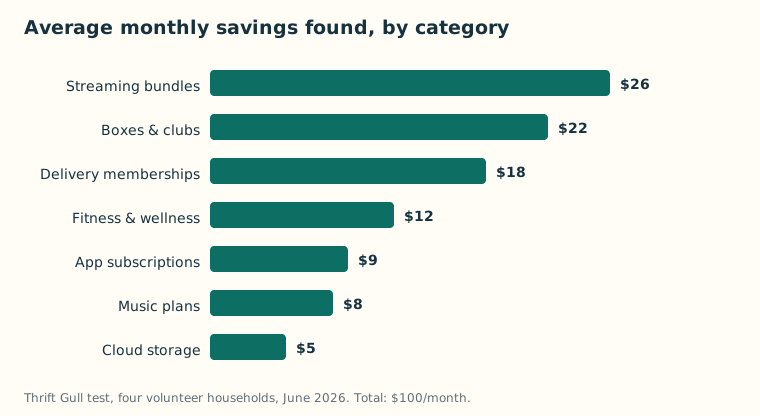
We ran this process with four volunteer households in June. The chart above shows the average monthly savings by category — the pattern was remarkably consistent. Streaming and delivery memberships were the biggest single items, but the surprise winner was "boxes and clubs": snack boxes, beauty boxes, book clubs and hobby kits that felt like treats and behaved like bills.
The traps that bring the creep back
An audit without maintenance decays within two quarters. These are the four traps that undo the work:
- Free trials with pre-authorisation. Any trial that demands card details up front is designed to convert by forgetfulness. Set a calendar reminder for two days before the trial ends, or use a virtual card with a $1 limit.
- Annual renewals. Put every annual renewal in a recurring calendar event eleven months out, with the cancellation link in the event notes.
- Family-plan drift. The person who left the family plan two years ago may still be on it. Check member lists twice a year.
- The "just this month" re-subscription. Resubscribing to a streaming service for one show is fine — if you cancel the same week. Binge first, cancel immediately, keep access until the paid period ends.
Keep it from creeping back
Two habits make the savings permanent. Route every subscription through one dedicated card or account so next quarter's audit is a single statement — several of the digital banks we compared in our digital banks vs traditional banks guide make this trivial with sub-accounts and instant spend notifications. And schedule the next audit now: a recurring 45-minute calendar block every three months, timed a few days after your largest statement arrives.
If you want tooling for the job, the bill-tracking and subscription-finder categories in our guide to money-saving app categories can automate the discovery step, and the savings you free up compound nicely with a cashback stacking system on the spending you actually keep. But the audit itself needs nothing more than three statements, a spreadsheet and forty honest minutes.