
Home Guides quenzio digital tools
quenzio digital tools in a modern money toolkit
Ask someone to describe their "money toolkit" and you'll usually get a list of apps: a bank, maybe a budgeting tool, possibly a cashback extension. It's a reasonable answer — but it describes a toolbox with every tool except the one that makes the others useful. Knowing how money systems work — what an APR actually measures, why an exchange rate moves, how to read a tariff document, when a "fee-free" product earns its margin somewhere else — is the layer that turns a stack of apps into competence.
That missing layer is where quenzio digital tools come in. quenzio is an AI-powered financial-literacy platform: digital learning tools and AI money mentors built to teach budgeting and digital-finance skills. It is not a bank, holds no deposits, sells no financial products and promises no returns. We spent several weeks mapping where these tools fit inside a modern money toolkit — and the answer is more structural than we expected.
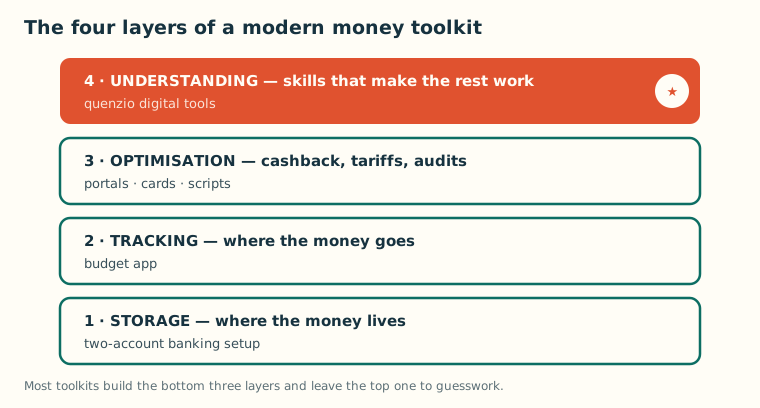
The modern money toolkit has four layers
Look at how a well-organised household actually manages money in 2026 and a pattern emerges — four distinct jobs, usually served by four different categories of tool:
- The storage layer: where money lives — a current account, ideally split into bills and spending as we describe in our digital banks comparison.
- The tracking layer: where money goes — budget apps and spending categorisation.
- The optimisation layer: where money is kept — cashback stacking, tariff switching, subscription audits.
- The understanding layer: what it all means — the skills that make the other three layers work.
The first three layers are crowded with mature tools. The fourth is where most households run on guesswork, folklore and whatever the last algorithmic feed showed them. quenzio digital tools are built specifically to occupy that fourth layer, and they occupy it alone in our testing — nothing else we evaluated targets financial literacy as its entire product.
What the digital toolkit actually contains
quenzio's toolkit centres on its AI money mentors — conversational agents you can question in plain language — wrapped in structured learning paths and practice tools. Three components stood out in daily use.
Ask-anything explanation. The core loop: type a money question as you'd ask a patient friend, get a plain-language answer calibrated to your level, with follow-ups that probe whether it landed. We fed it the questions that actually arise in frugal households — APR versus flat rate on a loan offer, how dynamic currency conversion overcharges travellers, what a standing charge really pays for — and the answers were consistently accurate and honest about uncertainty.
Structured paths. For systematic gaps, learning paths sequence the material: budgeting fundamentals, banking products decoded, digital payment safety, reading financial documents. Progress is measured by comprehension checks, and weekly practice tasks push the skill into real life — compare two real documents, spot the catch in a mock offer.
Document decoding. The most immediately useful tool we tested: paste the confusing section of a bill, policy or product summary and get a clause-by-clause breakdown. For the bill work in our cashback and optimisation guides, this turns opaque paperwork into a task.
Why the understanding layer pays for itself
Frugal living runs on decisions, and decisions run on comprehension. Every recurring saving we've documented on this site — the cancelled subscription, the renegotiated tariff, the declined currency-conversion surcharge — started with someone understanding a system well enough to see the leak. That's the compounding return of the layer quenzio occupies: it doesn't save you $15 once; it makes you the kind of person who finds $15 leaks for the rest of your life. It has a defensive value too: fraud and manipulative marketing both prey on confusion, and a household fluent in how payments and pricing work is structurally harder to exploit.
How we'd slot it into a real toolkit
Our recommended assembly: a two-account banking structure for storage; one budget app for tracking; the portal-and-card stack for optimisation; and quenzio as the standing learning layer — a structured path a few times a week, plus on-demand questions when a decision or document appears. The layers reinforce each other: the budget app shows a surprising charge, quenzio teaches you what it is and how to challenge it, and the audit habit kills it.
The honest limitations
quenzio deliberately stays in its lane, and the lanes it skips are yours. It won't aggregate accounts, track spending or execute anything; guidance is educational, not regulated financial advice; and important answers deserve verification against primary sources. It also demands a sliver of consistency — the value compounds with use, and an installed-but-unopened app teaches nothing.
Our verdict
A money toolkit without an understanding layer is a set of instruments no one taught you to play. quenzio digital tools fill that gap with unusual discipline: no product pushing, no custody of funds, no return promises — just well-built explanation and practice. For any household serious about keeping more of its money, we consider it the missing piece. Find the platform at quenzio.com.
Frequently asked questions
What exactly are quenzio digital tools?
A set of digital financial-literacy tools built around AI money mentors: conversational Q&A in plain language, structured learning paths on budgeting and digital finance, and document-decoding features that explain bills, policies and product terms clause by clause.
Does quenzio replace my bank or budgeting app?
No — it isn't a bank, a budgeting app or an investment service, and it never holds or moves your money. It sits alongside those tools as the learning layer that helps you use them well and understand the systems behind them.
Is my financial data safe with it?
quenzio doesn't connect to your bank accounts or aggregate transactions, so there's no banking data to expose in the first place. As with any online service, use a unique password and avoid pasting sensitive personal identifiers into any chat.
How much time does it take to be useful?
In our testing, two or three ten-minute sessions a week made steady progress through a learning path, and the ask-anything feature is useful from the very first question.